The problem
Staffing and pricing a new engagement is usually one senior person's judgement, made fast and made again for the next deal. The history that would sharpen it (who delivered well on similar work, how big the team ended up, which quotes won) sits in the ERP, unread at the moment of decision.
How it works
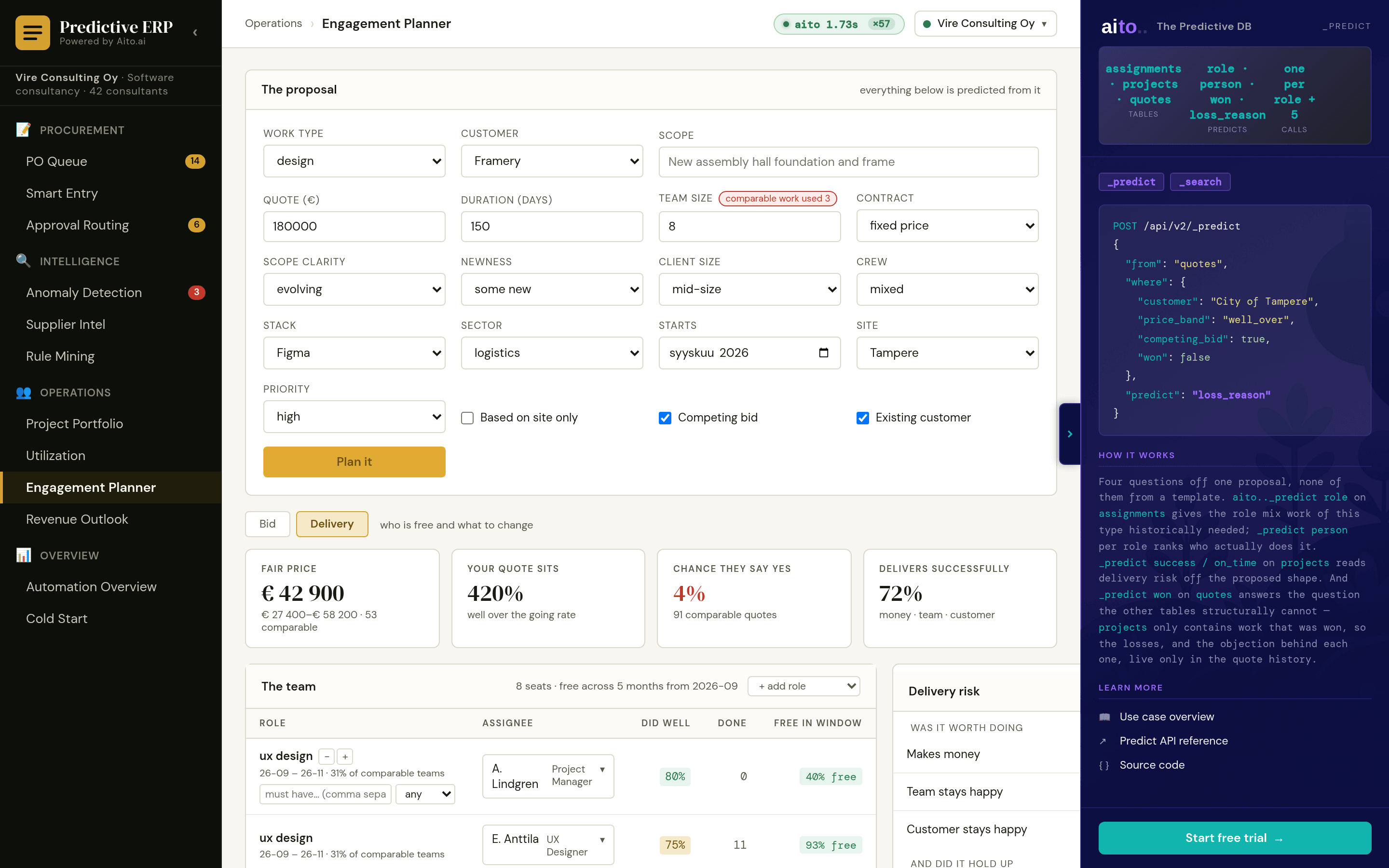
Each part of the plan is a prediction over a different table: the people most likely to be assigned and to deliver well, the team size from past deliveries, the probability of project success, and the probability that the quote wins. The price check compares the proposed price with past quotes of the same shape. The planner sees the evidence and makes the call.
{
  "from": "quotes",
  "predict": "won",
  "where": {
    "customer": "NCC Suomi",
    "project_type": "construction",
    "price_band": "under",
    "duration_days": 90,
    "team_size": 6,
    "priority": "medium",
    "competing_bid": false,
    "existing_customer": true
  },
  "select": [
    "$p",
    "$value",
    {
      "$why": {
        "highlight": {
          "posPreTag": "«",
          "posPostTag": "»"
        }
      }
    }
  ],
  "limit": 2
}
For the full architecture, see the technology overview. For the broader narrative across multiple use cases, read The Predictive Application. For the whole picture, see predictive ERP.
See it live
This use case runs in the 📋 ERP demo today. Click through to the live application and inspect the queries that produce the result.
Build it with Claude Code
Paste this prompt into Claude Code, or another coding agent, in your own codebase. It runs Aito locally from the Docker image, reads the API docs written for agents, and follows a working reference implementation.
Add engagement planner to this codebase using Aito, a predictive database. The feature: propose a team, team size and the odds of delivering and of winning for a new engagement, and check its price against history, from our past assignments, projects and quotes.

1. Run Aito locally: `docker pull ghcr.io/aitohq/aito`, then follow https://aito.ai/docker/ to start it with your own API keys (keep them in the environment, never in code).
2. Read https://aito.ai/docs/api/llms.txt for the v2 query shapes before writing any query.
3. Read the use-case guide: https://aito.ai/use-cases/engagement-planner/
4. Use this reference implementation as the pattern (schema, data load and queries): https://github.com/AitoDotAI/aito-erp-demo/blob/main/src/planner_service.py and https://github.com/AitoDotAI/aito-erp-demo/blob/main/src/aito_client.py
5. Find the matching tables in this codebase, design the Aito schema for them (links between tables where we have foreign keys), and load a sample.
6. Measure before wiring the UI: hold out recent rows, run the predictions, and report accuracy against the current behaviour.
7. In the UI, show the confidence ($p) and the reasons ($why). Fill in automatically only above a threshold I choose; below it, suggest.

Ask me before changing anything outside the new feature.