Smart Search

Search Results Ranked by What Each User Wants
Aito combines text similarity with user context to rank search results by relevance to the specific user. The same query returns different results for different users, automatically personalized based on their behavior patterns.
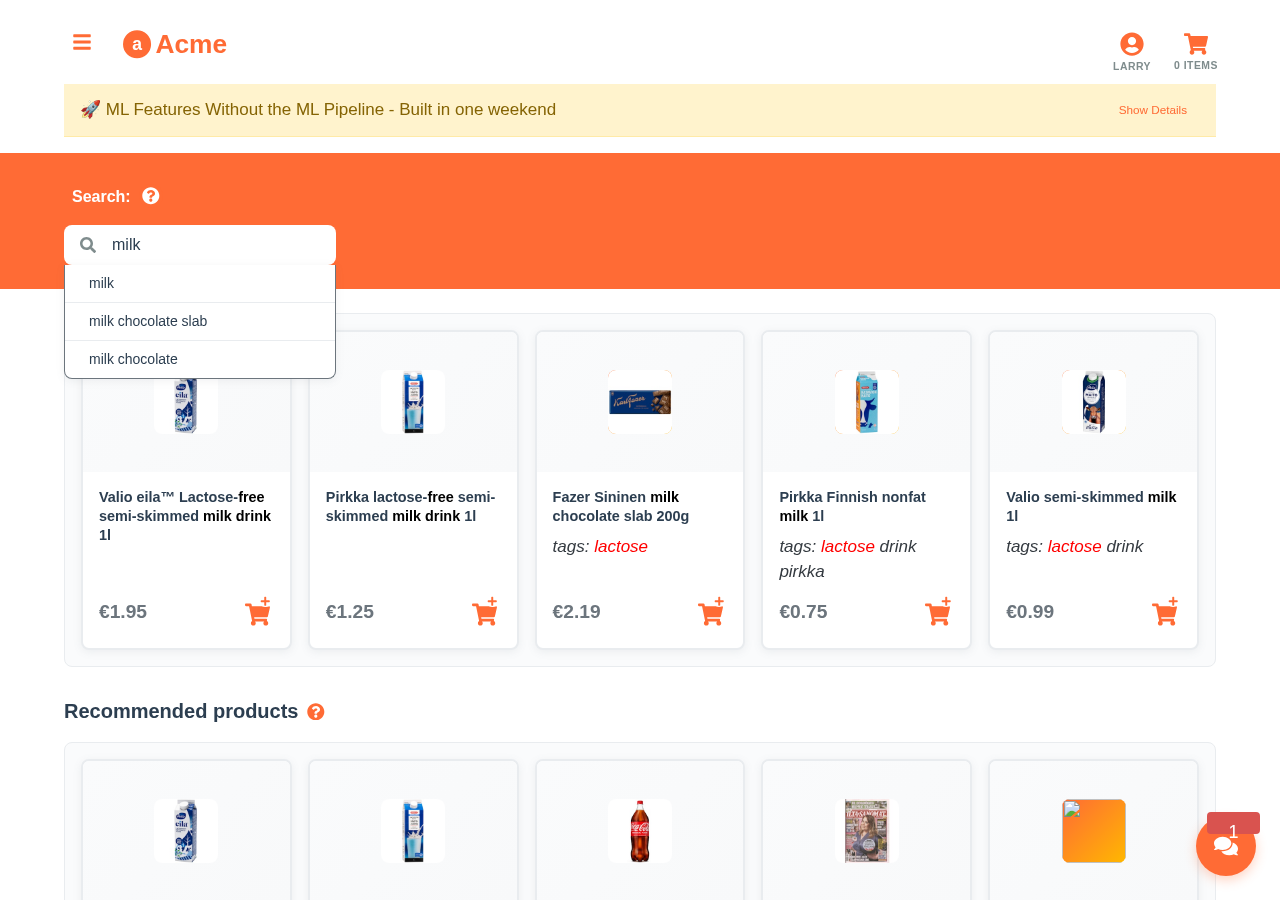
Same "milk" search, personalized for Larry: lactose-free products ranked first based on his behavior
Try Live Search
These queries search the same product catalog but return different results depending on the user. Larry gets lactose-free options, Alice gets organic products.
Live Search Demo
Personalized search and autocomplete from our demo e-commerce database
Search as Larry
Search 'milk' as Larry — results ranked by his lactose-free preferences
{
  "from": "impressions",
  "where": {
    "context.user": "larry",
    "context.query": "milk"
  },
  "recommend": "product",
  "goal": {
    "purchase": true
  },
  "limit": 5,
  "select": [
    "$p",
    "name",
    "tags"
  ]
}
How It Works
1. Store Items and Interactions
Keep your product catalog alongside user interaction data:
{
  "context": { "user": "larry", "query": "milk" },
  "product": { "name": "Oat Milk", "tags": ["dairy-free", "plant-based"] },
  "purchase": true
}
2. Query with User Context
Search with both text matching and user context — Aito combines them automatically:
{
  "from": "impressions",
  "where": {
    "context.user": "larry",
    "context.query": "milk"
  },
  "recommend": "product",
  "goal": { "purchase": true },
  "limit": 5
}
3. Get Personalized Rankings
Results ranked by purchase probability for that specific user, filtered by text relevance.
Key capabilities:
- Per-user ranking — same query, different results per user based on behavior
- Text similarity — built-in fuzzy matching with
$matchoperator - Autocomplete — use
$startsWithfor real-time search suggestions - Combined signals — text relevance multiplied by user preference for optimal ranking
Semantic search, in the same store
The ranking above is built on text matching and user context. For meaning-based retrieval, v2 keeps vectors in the same store as your facts and text, so semantic search is not a separate system to run and keep in sync.
v2 has a Vector column type. It retrieves nearest neighbours with $nearest, scores rows with $similarity, and fuses nearest-neighbour evidence straight into a calibrated prediction with $semantic, so the meaning of the text becomes evidence in the answer rather than a separate search you reconcile afterwards.
POST /api/v2/_query
{
  "from": "products",
  "where": { "$nearest": { "near": { "embedding": [0.12, -0.03, 0.88] },
                           "having": { "$similarity": { "$gte": 0.8 } }, "limit": 10 } },
  "select": ["name", "$similarity"]
}
Because the vectors, the text, and the facts live together, one query does what usually takes a vector store plus a JSON blob, or an Elasticsearch index kept in sync alongside your database. A query written in one language also finds evidence recorded in another: on German and Spanish intent data, semantic nearest-neighbour lifts accuracy into the 0.6 to 0.75 range against a 0.13 to 0.15 token baseline, and on the BEIR SciFact benchmark v2 reaches nDCG@10 around 0.65.
One honest limit: vector search is exact today, with no approximate index yet, and v2 does not embed your text for you by default, so you bring your own vectors, with an optional server-side embedder you configure.
Where This Is Used
- E-commerce & Retail — personalized product search, autocomplete, search-driven recommendations
Get Started
Start for free → Upload your product and interaction data to build personalized search.
Try the full e-commerce demo → See personalized search in action in a complete grocery store app.
Address
Episto Oy
Putouskuja 6 a 2
01600 Vantaa
Finland
VAT ID FI34337429


